
Fridge POV AI Video Generator
Put yourself or your pet in the midnight snack scene. Upload one photo and let the fridge camera catch a spoonful of tiramisu, a closed door, and a second visit with a guilty look.
1 photo · 10-second preset · vertical video · from 30 credits
Create your fridge POV video
10 seconds · 9:16 · two snack visits
JPG, PNG or WebP · up to 10 MB · one subject · automatically compressed before upload
Powered by MiniMax H3 Max
Real generated example
Upload one person or pet photo. The preset directs the fridge camera, two snack visits and a guilty final look. AI motion and appearance can vary.
What Is the Fridge POV AI Effect?
Fridge POV means the camera watches from inside a refrigerator. The dessert sits near the lens, while the person opening the door appears beyond it. In the tiramisu version, the subject sneaks a spoonful, closes the door, then returns for another bite. The last look at the camera is the punchline.
This generator creates a new scene around the subject in your photo. You do not need to film your kitchen, upload a reference video, or find a separate editing template. The preset supplies the camera, lighting and action sequence; your photo guides the subject's appearance.
A person or pet can be the midnight snacker. Pet scenes use a playful anthropomorphic performance, so review paws, the spoon and the eating motion. The model can approximate the timing and change facial details; a clear input gives it a better reference.
How to Make a Fridge POV AI Video
Upload one clear photo
Choose one person or pet, facing the camera, with the eyes visible. A head-and-torso photo provides useful clothing and appearance details. JPG, PNG and WebP files up to 10 MB are compressed in your browser before upload.
Choose quality and check the cost
The scene uses a 10-second vertical preset. Start at 480p for 30 credits, or choose 768p for 45 credits. Optionally add a short expression or mood note. The fridge, dessert and camera direction are already prepared.
Generate, review and download
Sign in and confirm your photo permission, then generate. Your task is saved for your account in this browser and can resume after refresh. Review the full result, then download the MP4. Confirmed failed generations receive a credit refund.
Fridge POV AI Video Example
A real 10-second preset result generated from the AI-created adult portrait shown below. The player shows the model's output, including any imperfections; your result will vary.
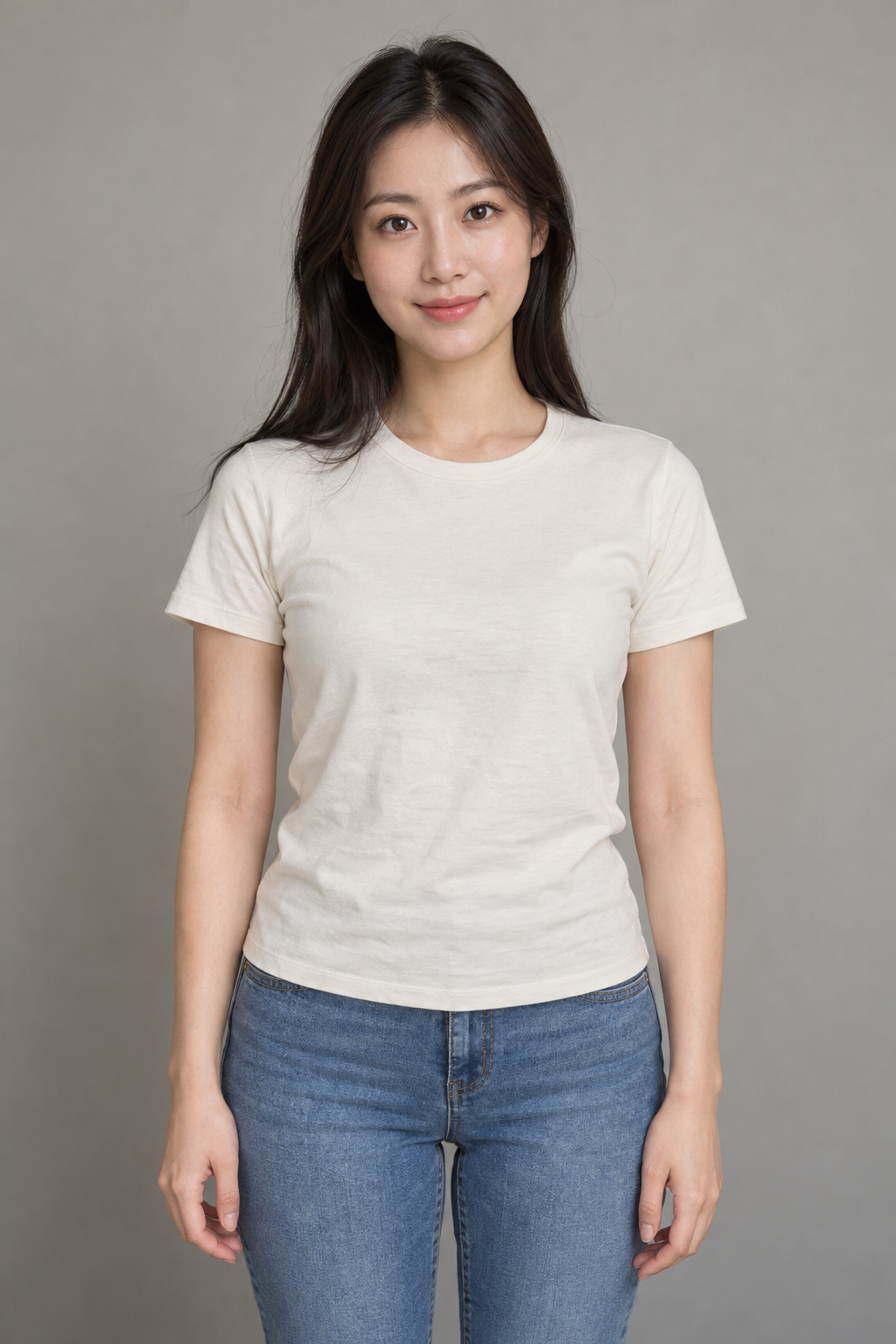
Fridge POV AI Prompt: Copy the Scene Direction
Use this prompt as a starting point in a video tool that accepts a subject reference. In the generator above, the full scene is already built in; use the optional field only for expression or mood.
Midnight tiramisu scene
Fixed POV camera inside a refrigerator, looking past a tray of tiramisu into a dark kitchen at midnight. 0-3 seconds: start with the door already opening; the subject quickly takes and eats one small spoonful. 3-4 seconds: close the door completely for a brief dark transition. 4-8 seconds: the SAME subject reopens the door and takes and eats one more small spoonful from the visibly reduced dessert. 8-10 seconds: stop eating and hold a clear guilty look into the camera, with the door open. Complete both bites before the final two-second reaction. Use brisk, simple actions without slow motion, an establishing shot, extra visits or an outro. Less dessert remains after each bite. Keep the same subject and refrigerator layout throughout. Vertical 9:16, 10 seconds, fridge and spoon sounds, no music or text.
Choose a Photo That Gives the Model a Clear Reference
| Photo or setting | Practical advice |
|---|---|
| One clear person or pet | Use an individual portrait. A group photo can make the intended subject ambiguous. |
| Face, eyes and upper body visible | A front-facing or slight-angle photo gives the model more identity and clothing detail. |
| Blur, masks or heavy filters | These hide details. Higher output resolution cannot recover a face missing from the input. |
| A pet photo | Use visible eyes and recognizable fur markings. Expect a stylized snack performance and check the anatomy. |
| Two photos or a product ad | This preset accepts one subject. For a two-subject performance try Hotel Lobby; product advertising is a different scene. |
What to Check Before Sharing
The same snacker on both visits
Watch the face or fur markings before and after the closed-door transition. AI identity preservation is imperfect, especially when the reference face is small or partially hidden.
A believable spoonful
Check the hand or paw, spoon and mouth contact. The prompt requests a smaller dessert after each visit, but the exact food amount and timing may vary.
The whole scene, with sound
The preset requests fridge hum and spoon sounds without speech or music. Listen to the generated audio and check the camera stays inside the fridge. Label synthetic content where required.
Fridge POV AI Questions
What is Fridge POV AI?
It is a photo-to-video effect with the camera inside a refrigerator, watching someone sneak food at midnight. This preset uses tiramisu, two snack visits and a guilty final look.
How many photos do I need?
One photo of one person or pet. A clear face with visible eyes and upper body works best. This version does not accept a second subject or a reference video.
Can I make a cat or dog fridge POV video?
You can use a pet photo as the subject reference. The example on this page shows an adult portrait; you can also upload a pet photo. Pets may be rendered in an anthropomorphic style; check fur markings, paws and the spoon. Photorealistic pet results are not guaranteed.
Is there a free fridge POV AI generator?
This tool uses site credits: 30 credits at 480p or 45 at 768p. The site's 6 signup credits do not cover this 10-second preset. Check the displayed cost before generating; confirmed failed renders are refunded.
Is this a CapCut template or a face swap?
It generates a new scene using your photo as a subject reference. You do not need CapCut or an existing clip. The original meme footage is not used as the base video.
Does the video include sound?
The model generates an audio track. The preset requests original fridge and spoon sounds without dialogue or music. It does not include audio from an original social-media video. Listen to the result before publishing.
How long is the output and which model does it use?
The generator uses MiniMax H3 Max through fal with a 10-second, 9:16 preset and either 480p or 768p quality. The model may produce a slightly different duration or native frame size. Download is MP4.
What happens if the request times out or the generation fails?
A temporary connection error keeps your saved task and retries checking it without another generation. Refreshing on the same browser and account resumes that task. Confirmed failed renders refund the charged credits. A task with uncertain submission remains saved until its status is confirmed.
Which photos may I upload?
Use your own pet photo or an adult's photo that you have permission to use. Do not upload identifiable public figures or anyone under 18. The model's content checks remain enabled.
Try Another AI Video Effect
For two subjects in a recording booth, try Hotel Lobby. Browse the effects library for another scene, or use the general video tool for a custom idea.